Income on Your P&L Doesn't Match Your Bank Deposits? A Year-End Tie-Out You Can Do Yourself
↓ Get the free Excel + PDF kit for this article
You open your Profit & Loss in December and the income looks too good, or too low, compared with what you remember putting in the bank. This is one of the most repeated questions in QuickBooks user forums: "my income is doubled," "my P&L shows the invoices and the bank deposits," "why doesn't my income match my deposits?" The fix is rarely one magic button. It is a simple tie-out: start from the bank, remove what is not income, add back what never reached the bank, and compare. If you do it before year-end, you hand your tax preparer numbers you can explain.
Who has this problem, and why it matters
It shows up most often in businesses that send invoices and use bank feeds, businesses paid through card processors or marketplaces (payouts arrive net of fees), and owners who move money between personal and business accounts. Overstated income can mean paying tax on money you never earned. Understated income is worse if anyone ever asks you to show how you got the number: the IRS lists deposit information among the records that support gross receipts.
The one-line method
Expected income = Bank deposits − Non-income deposits + Add-backs ± Timing. Then Gap = Income on your P&L − Expected income. A gap close to zero means your books tie out.
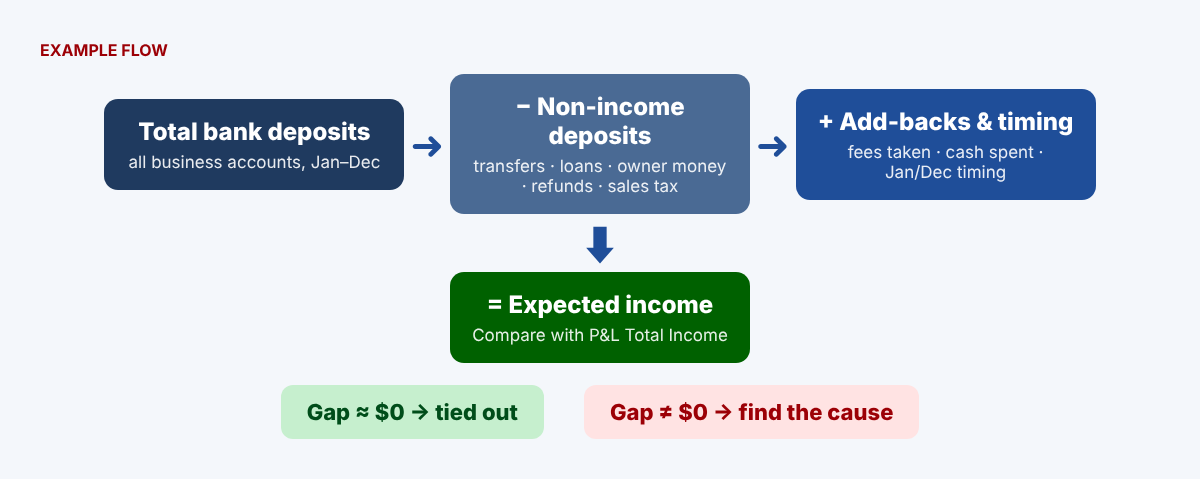
Step 1: Total your bank deposits
Add the "total deposits" line from all twelve monthly statements for every business account. The bank's number is your anchor. In Excel or Google Sheets, put the monthly totals in B2:B13 and type =SUM(B2:B13).
Step 2: List deposits that are not income
Go through the statements and list transfers from your own accounts, loan or credit-line money, owner money you put in, vendor refunds and rebates, and sales tax you collected. With a type in column C and amounts in column D, =SUMIF(C:C,"Loan",D:D) totals each type and =SUM(D:D) gives the total to subtract.
Step 3: Add back income that never reached the bank
Card processors and marketplaces deduct fees before paying you, so your sales are higher than your deposits. Add those fees back, plus cash sales you spent before depositing and any payments still sitting in Undeposited Funds on December 31.
Step 4: Adjust for January and December timing
Subtract last year's sales that were deposited this January; add this year's sales deposited next January. If your P&L is on the accrual basis, also add the increase in accounts receivable for the year.
Step 5: Compare and read the gap
| Line (EXAMPLE VALUES) | Amount |
|---|---|
| Total bank deposits | $186,450 |
| − Non-income deposits (transfer, loan, owner money, refund) | ($22,850) |
| + Processor fees, cash spent, Undeposited Funds | +$3,940 |
| − Last year's sales deposited in January | ($3,400) |
| + This year's sales deposited next January | +$2,750 |
| = Expected income | $166,890 |
| Income on the P&L | $171,690 |
| Gap | +$4,800 |
In Excel: =B1-B2+B3-B4+B5 for expected income and =B7-B6 for the gap. A positive gap usually means something was counted twice. A negative gap usually means a sale is missing or a deposit went to a balance-sheet account.
Finding a double count
Export your income transactions (QuickBooks report: Transaction Detail by Account, income accounts only) to a sheet with Date in A, Type in B and Amount in E. Next to each Deposit row, this formula flags a sale with the same amount within 7 days: =IF(B2="Deposit",IF(COUNTIFS(B:B,"<>Deposit",E:E,E2,A:A,">="&A2-7,A:A,"<="&A2+7)>0,"CHECK",""),"").
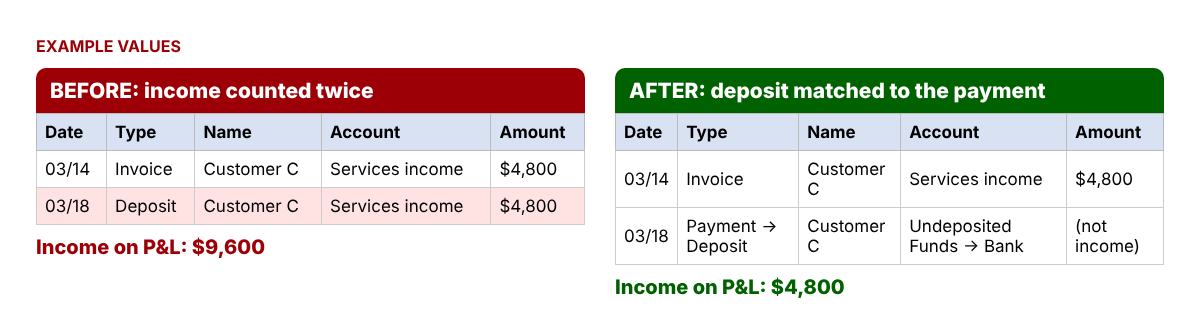
Fix it in QuickBooks Desktop
- Record the customer payment with Receive Payments (or a sales receipt) so the money goes to Undeposited Funds.
- Go to Banking > Make Deposits, select the payment in the Payments to Deposit window, choose the bank account and Save & Close.
- If a deposit already has a line coded to an income account for that same money, open the deposit and remove that line, then add the payment from Undeposited Funds.
- To review deposits, use Reports > Report Center > Banking > Deposit Detail.
Fix it in QuickBooks Online
- Open Bank transactions (newer screens: All apps > Accounting > Bank transactions; older: Transactions > Bank transactions).
- For a deposit that was already added to an income category, open the posted (older: categorized) list and undo it so it returns to the list waiting for review.
- Choose Match and pick the existing invoice payment or sales receipt instead of a category. Intuit's help explains that matching links the transaction to records you already have and prevents duplicate entries.
- If several payments arrived as one deposit, create a Bank Deposit (+ Create or + New > Bank Deposit), check the payments, confirm the total equals the bank amount, save, then match the bank line to it.
- For payouts net of fees, add a line on the deposit with the fee as a negative amount to a fee expense account.
- To review, go to Reports > Standard reports and search for Deposit Detail.
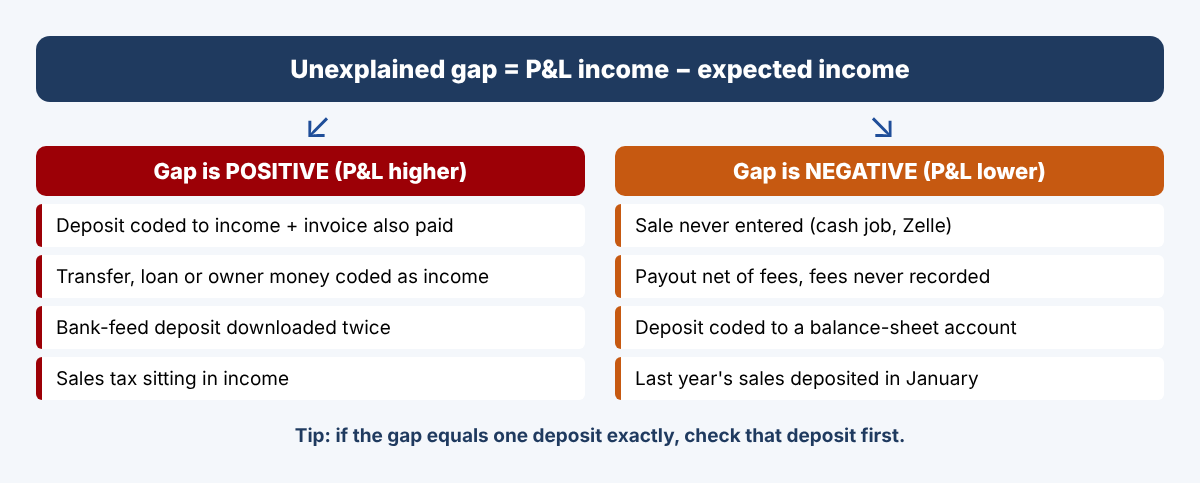
Common causes at a glance
| Cause | Gap | Fix |
|---|---|---|
| Deposit coded to income and invoice also paid | Higher | Match the deposit to the payment |
| Transfer between your accounts coded as income | Higher | Record it as a transfer |
| Loan or owner money coded as income | Higher | Use the loan or owner equity account |
| Bank-feed deposit downloaded twice | Higher | Exclude or delete the duplicate |
| Payout net of fees, fees not recorded | Lower | Add the fee line on the deposit |
| Sale never entered | Lower | Enter the sale, then match the deposit |
Common mistakes
- Starting from the QuickBooks deposit report instead of the bank statements. If the books are wrong, the report is wrong too.
- Leaving out a second business account, which makes every transfer look like income.
- Comparing a cash-basis tax return with an accrual-basis P&L (or the reverse).
- Deleting transactions in a period your tax preparer already used, without telling them.
- Comparing a Form 1099-K with deposits. The 1099-K shows gross payments before fees and refunds, so compare it with gross sales.
FAQ
How close is close enough?
Many owners accept a gap of a few dollars (rounding, small bank interest timing). Anything close to a single deposit or a round number deserves a look.
Is bank interest a problem?
No. Interest is income on the P&L and is also a deposit, so it needs no adjustment.
Will I get a Form 1099-K for 2026?
For 2026, payment apps and marketplaces generally issue one when payments for goods or services exceed $20,000 and 200 transactions, per the IRS. You still report all business income whether or not you receive one.
What about refunds I received from vendors?
They are deposits but not sales. Record them against the original expense, and list them as non-income in the tie-out.
Quick checklist
- All business bank accounts reconciled through 12/31
- Non-income deposits listed and totaled
- Fees, cash spent and Undeposited Funds added back
- January and December timing adjusted
- P&L run on the same basis as your tax return
- Every flagged deposit checked and fixed
- Final tie-out saved as a PDF with your year-end files
You can download the ready-made Bank Deposits vs Income Tie-Out Kit for free in the Free kit download box below (Excel + PDF guide, no sign-up).
This article is for educational purposes only and is not tax, legal or accounting advice. How a deposit is reported on your return depends on your facts; ask a qualified tax professional. Menu names in QuickBooks Online change often and may differ on your screen. QuickBooks is a registered trademark of Intuit Inc.; not affiliated with or endorsed by Intuit.
Sources
- Intuit: Record and make bank deposits in QuickBooks Online
- Intuit: Record and make bank deposits in QuickBooks Desktop
- Intuit: Match transactions in QuickBooks Online
- Intuit: Fix downloaded bank transactions
- IRS: What kind of records should I keep
- IRS: Form 1099-K threshold FAQs under the One, Big, Beautiful Bill
Free kit download
Tools to follow this article step by step. No sign-up needed.
- Excel workbook (.xlsx)Deposit_Income_TieOut_2026_EN.xlsx · 45 KB
- Step-by-step guide (PDF)Deposit_Income_TieOut_2026_Guide_EN.pdf · 136 KB
Free to use for yourself and your own business; please do not resell or redistribute. General information, not tax, legal or accounting advice; check every figure against your own records. QuickBooks is a trademark of Intuit Inc.; BIZLEX is not affiliated with Intuit.