Why Your Cash Flow Statement Doesn't Match the Bank (and How to Make It Tie)
↓ Get the free Excel + PDF kit for this article
You run the Statement of Cash Flows, look at Cash at end of period, and it doesn't match your bank balances or the cash on your Balance Sheet. Or the totals match, but loan payments show up in Operating and depreciation sits in Investing. This is one of the most repeated questions in QuickBooks forums, and many threads end with a workaround rather than a fix. If you hand financial statements to a lender, a partner or your tax preparer, a cash flow statement that doesn't tie undermines everything else in the package.
The good news: a cash flow statement is pure arithmetic. If your Balance Sheet balances, the statement must tie to the penny. This guide shows you how to rebuild it yourself from two Balance Sheets and one Profit & Loss, and how to find the exact cause of any difference.
Step 1: Understand what the report is really doing
The indirect method starts with net income and adjusts it for every balance sheet account that changed. Cash itself is the one thing it doesn't list, because cash is the answer.
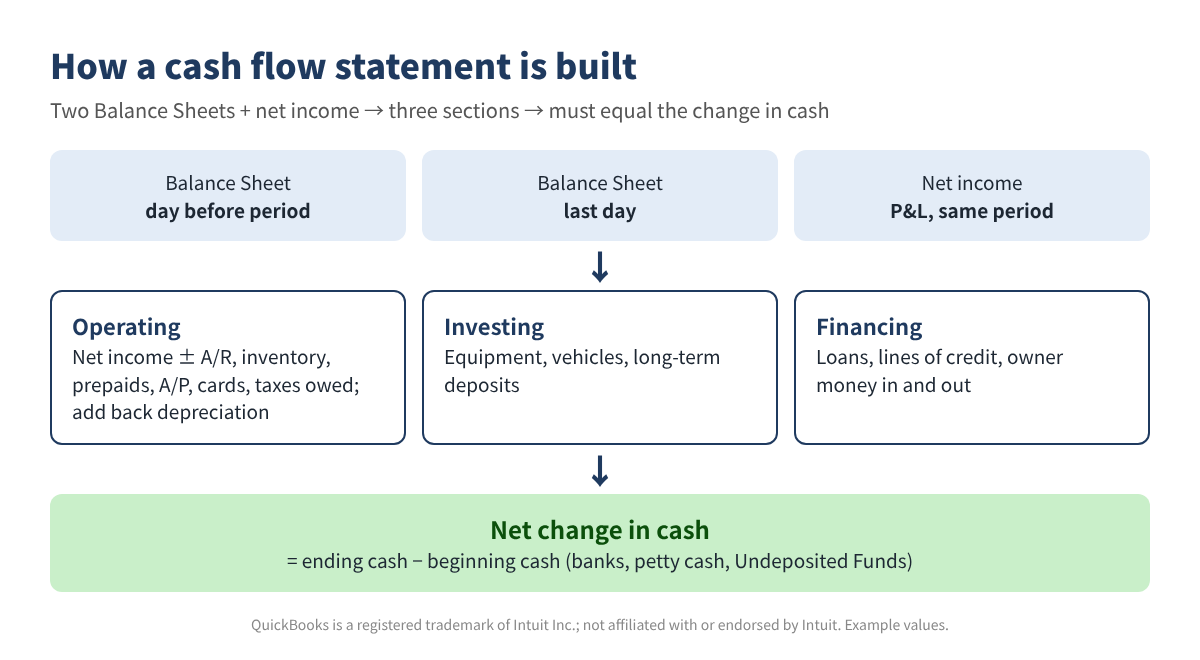
The sign rule is where most hand-built statements go wrong: when a non-cash asset goes up, cash goes down (you spent money or haven't collected it yet). When a liability or equity account goes up, cash goes up (you borrowed, or someone put money in).
Step 2: Pull the three reports
QuickBooks Desktop
- Reports > Company & Financial > Balance Sheet Standard, dated the day before your period starts (for Jan 1 – Oct 31, use Dec 31 of last year).
- The same report dated the last day of the period.
- Reports > Company & Financial > Profit & Loss Standard for the period. Note net income.
- Optional: Reports > Company & Financial > Statement of Cash Flows for the same dates, to compare.
QuickBooks Online
Intuit's help article on the Statement of Cash Flows gives this path: go to Reports, then Standard reports, search for the report name and open it, then use Customize to change the report period. Use the same path for Balance Sheet (run it twice, once for each date) and Profit and Loss. Export each one to Excel. The same article notes that the Online Statement of Cash Flows runs on accrual basis only.
Step 3: Lay out the balances and apply the formulas
Put one row per balance sheet account in Excel or Google Sheets: name in A, type in B, beginning balance in C, ending balance in D. Enter amounts the way the Balance Sheet shows them: liabilities and equity as positive numbers, accumulated depreciation and owner draws as negatives.
| Account (EXAMPLE values) | Type | Dec 31, 2025 | Oct 31, 2026 | Change | Cash effect |
|---|---|---|---|---|---|
| Business Checking | Bank (cash) | 18,400 | 23,950 | 5,550 | — |
| Undeposited Funds | Cash | 1,250 | 3,480 | 2,230 | — |
| Accounts Receivable | Asset | 6,200 | 8,900 | 2,700 | (2,700) |
| Equipment | Fixed asset | 42,000 | 50,500 | 8,500 | (8,500) |
| Accumulated Depreciation | Contra asset | (12,600) | (16,100) | (3,500) | 3,500 |
| Business Credit Card | Liability | 2,850 | 4,120 | 1,270 | 1,270 |
| Equipment Loan | Liability | 28,000 | 23,500 | (4,500) | (4,500) |
| Owner Draws | Equity | 0 | (14,000) | (14,000) | (14,000) |
- Change:
=D2-C2 - Cash effect:
=IF(B2="Asset",-(D2-C2),D2-C2)(leave cash accounts blank) - Section totals:
=SUMIF(F:F,"Operating",E:E), and the same for Investing and Financing in a section column F - Net change:
=NetIncome+Operating+Investing+Financing - Proof:
=EndingCash-BeginningCash-NetChangeshould be 0
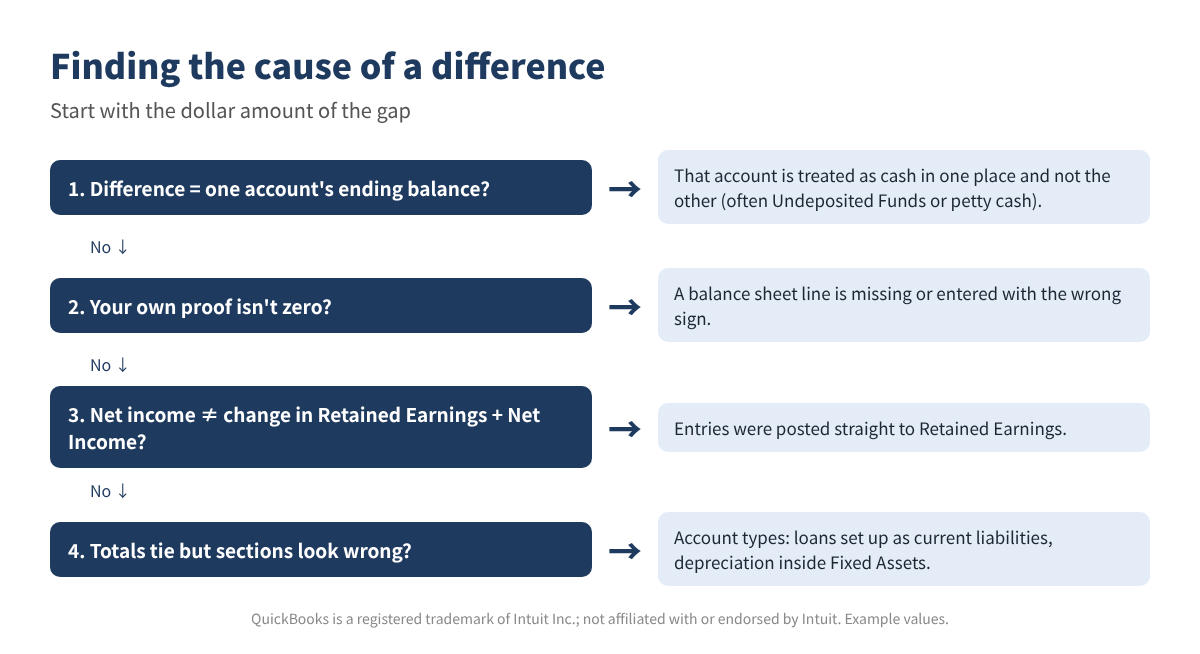
Treat Retained Earnings and the Net Income line together: their combined change should equal net income for the period. If it doesn't, someone posted entries directly to Retained Earnings, and that amount belongs in Financing until your accountant reviews it.
| Section (EXAMPLE, Jan 1 – Oct 31, 2026) | Amount |
|---|---|
| Net income | 32,850 |
| Operating adjustments (A/R, inventory, prepaid, depreciation, A/P, card, taxes owed) | 1,430 |
| Net cash from operating | 34,280 |
| Net cash from investing (equipment) | (8,500) |
| Net cash from financing (line of credit, loan, owner draws) | (16,000) |
| Net change in cash | 9,780 |
| Cash at beginning (29,650) + change | 39,430 |
| Cash on the ending Balance Sheet (23,950 + 12,000 + 3,480) | 39,430 ✓ |
Step 4: When your numbers and the report disagree
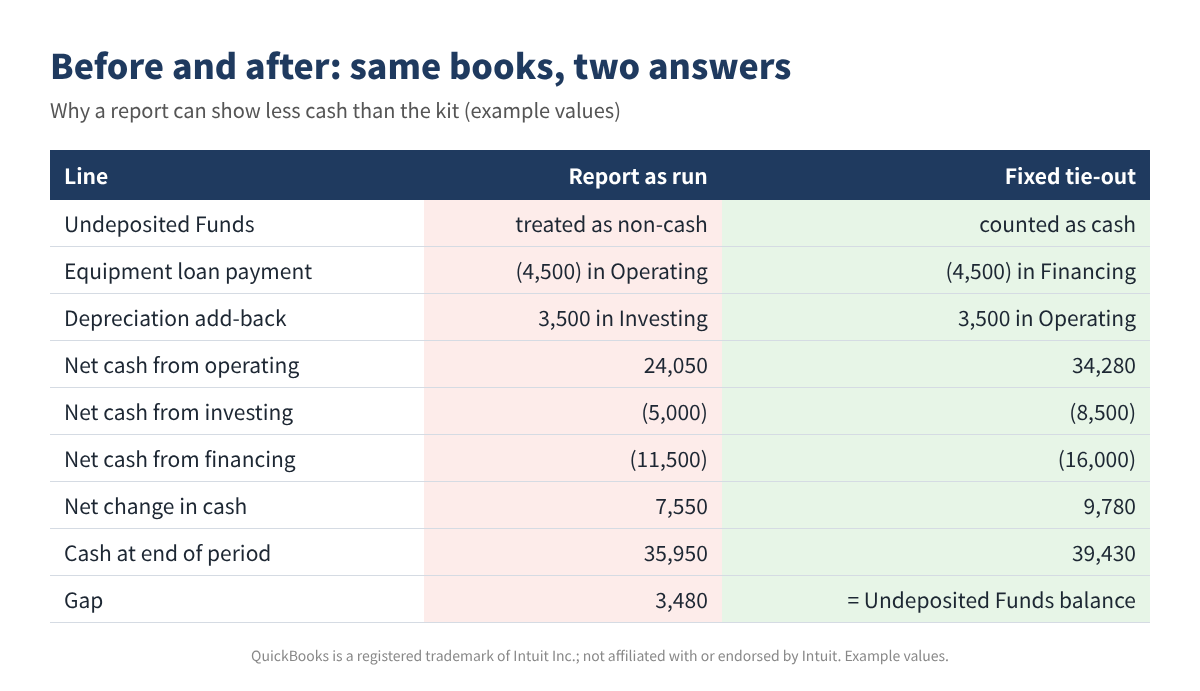
Look at the size of the gap first. If it equals one account's ending balance exactly, that account is being counted as cash in one place and not in the other. Undeposited Funds and petty cash are the usual suspects. If your own proof is off, a balance sheet line is missing or has the wrong sign.
Fixing classification inside QuickBooks
Desktop: Edit > Preferences > Reports & Graphs > Company Preferences. Under Statement of Cash Flows, the Classify button lets you assign each balance sheet account to Operating, Investing or Financing (admin only). Online: an Intuit moderator confirmed in the QuickBooks Community that reclassifying accounts on this report isn't available in Online; the section follows the account type. If a long-term loan was set up as an Other Current Liability, review the account type with your accountant, or present your own rebuilt statement.
Common mistakes
- Using a beginning Balance Sheet dated the first day of the period instead of the day before.
- Leaving out accounts with a zero beginning or ending balance (a new loan, a closed account).
- Flipping signs: entering liabilities as negatives or accumulated depreciation as a positive number.
- Comparing an accrual-basis cash flow with a cash-basis Balance Sheet or P&L.
- Running the report with a class or location filter: balance sheet lines often have no class.
- Forgetting Undeposited Funds, so cash at end looks short by exactly that balance.
FAQ
Should Undeposited Funds count as cash?
It holds payments you have received but not yet deposited, so most bookkeepers treat it as cash. Whatever you choose, be consistent, and clear it out regularly so the question goes away.
Why is depreciation in Investing on my report?
Accumulated depreciation usually sits inside the Fixed Asset group, so the report treats its change like an asset purchase. Under the indirect method, depreciation is a non-cash expense that is added back in Operating.
Can I fix the Online report itself?
Not the section placement, based on Intuit's answers in the Community. You can correct account types where they are wrong, or rebuild the statement in a spreadsheet as shown above.
My statement ties, but cash went down while I made a profit. Is that wrong?
No. Profit can be tied up in receivables and inventory, spent on equipment, or used to pay down loans and owner draws. The three sections show where it went.
Checklist
- Reconcile every bank and credit card account through the period end.
- Deposit or clear Undeposited Funds.
- Run Balance Sheets for the day before the period and the last day.
- Run the P&L for the same period and basis.
- List every balance sheet account; proof equals zero.
- Loans in Financing, equipment in Investing, depreciation added back in Operating.
- Net income matches the change in Retained Earnings plus Net Income.
- Note non-cash items, such as assets bought with a loan.
You can download the ready-made Cash Flow Statement Tie-Out Kit 2026 for free in the Free kit download box below (Excel + PDF guide, no sign-up).
This article is for education only and is not tax, legal or accounting advice. All numbers are examples. Menu paths were checked against Intuit's help articles in November 2026 and can change. QuickBooks is a registered trademark of Intuit Inc.; not affiliated with or endorsed by Intuit.
Sources
- Intuit: How to run a Statement of Cash Flows (QuickBooks Online)
- Intuit: Set report preferences (QuickBooks Desktop)
- QuickBooks Community: Statement of cash flows classification (Online)
- QuickBooks Community: Ending cash on cash flow report does not match ending cash on balance sheet
- QuickBooks Community: Undeposited funds and statement of cash flow
- QuickBooks Community: Statement of cash flows shows non-cash transactions
Free kit download
Tools to follow this article step by step. No sign-up needed.
- Excel workbook (.xlsx)Cash_Flow_Statement_TieOut_Kit_2026_EN.xlsx · 26 KB
- Step-by-step guide (PDF)Cash_Flow_TieOut_Guide_2026_EN.pdf · 110 KB
Free to use for yourself and your own business; please do not resell or redistribute. General information, not tax, legal or accounting advice; check every figure against your own records. QuickBooks is a trademark of Intuit Inc.; BIZLEX is not affiliated with Intuit.