Booking the Whole Loan Payment as an Expense? How to Split Principal and Interest and Tie Out the Loan at Year-End
↓ Get the free Excel + PDF kit for this article
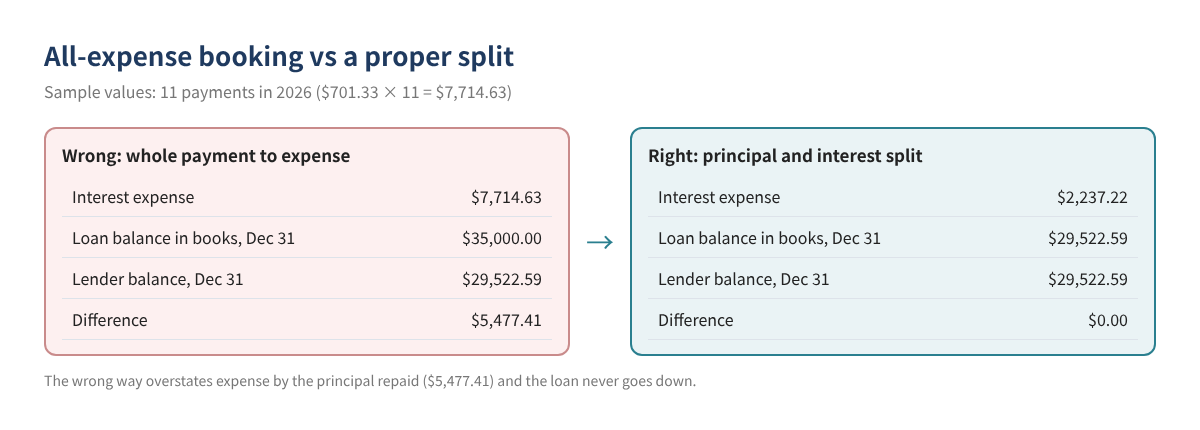
In the books of businesses with an equipment loan, vehicle loan or term loan, the most common mistake is booking the entire monthly payment to an expense account such as "Interest" or "Loan payment." That overstates expenses, and the loan on the balance sheet never drops below the amount originally borrowed. When the lender's year-end statement arrives, that is usually why the books are off by thousands of dollars.
This post covers how a payment splits into principal and interest, how to calculate the split yourself in a spreadsheet, how to record it as two lines in QuickBooks Online and Desktop, and how to tie the loan out to the lender at year-end, with sample numbers throughout.
Who this is for: owners who record business loan payments each month, anyone whose loan balance doesn't match the lender, and anyone cleaning up loan accounts before closing the year.
1. Every payment has two parts
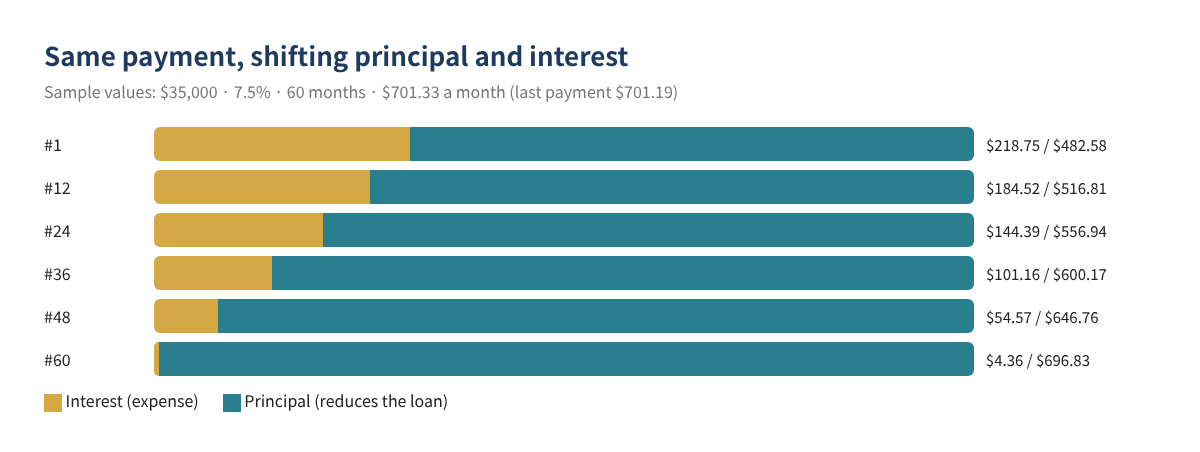
A typical installment payment mixes interest (the cost of borrowing for the period, an expense) and principal (the part that reduces what you owe, recorded against the loan liability). Early payments are mostly interest; later ones are mostly principal.
2. Calculate the split in a spreadsheet
No schedule from the lender? Excel or Google Sheets can do it. Each month: interest = prior balance × annual rate ÷ 12; principal = payment − interest; new balance = prior balance − principal.
| Cell | What | Formula (sample) |
|---|---|---|
| B1 | Loan amount | 35000 |
| B2 | Annual rate | 0.075 |
| B3 | Number of monthly payments | 60 |
| B4 | Monthly payment | =ROUND(PMT(B2/12,B3,-B1),2) → 701.33 |
| C7 | Interest, payment 1 | =ROUND(B1*$B$2/12,2) → 218.75 |
| D7 | Principal, payment 1 | =$B$4-C7 → 482.58 |
| E7 | Balance after payment 1 | =B1-D7 → 34,517.42 |
From payment 2 on, point the interest formula at the previous row's balance (E7) and copy down. Rounding makes the last payment slightly different ($701.19 in this example).
Watch out: SBA loans and lines of credit often charge interest by the day, so this monthly math will be off by a few dollars. Use the interest figure on the lender's statement when you have it.
3. Record it as two lines in QuickBooks
QuickBooks Online
Per Intuit's help article "Set up a loan in QuickBooks Online," create the loan account under All apps → Accounting → Chart of accounts → New: Other Current Liabilities (detail type Loan Payable) for a loan paid off within the fiscal year, or Long Term Liabilities (detail type Notes Payable) for a longer one. Menus move around; if you can't find it, search for "Chart of accounts."
- Create the payment (check or expense) from the bank account the money left.
- Line 1: the loan liability account, principal amount.
- Line 2: the interest expense account, interest amount.
- Put any fees on a third line.
- When the bank feed downloads the withdrawal, match it to this payment instead of adding it again.
QuickBooks Desktop
Per Intuit's "Manually track loans in QuickBooks Desktop," use Banking → Write Checks: on the Expenses tab, line 1 is the loan liability account with the principal, line 2 is the interest expense account with the interest. The same help notes that Loan Manager was discontinued in QuickBooks Desktop 2022 and works only in earlier supported versions, so on current versions you split the payment yourself.
4. Worked example: an equipment loan
A fictional business borrows $35,000 for equipment in January 2026 (7.5%, 60 months) and pays $701.33 a month starting February 1. All figures are sample values.
| # | Date | Payment | Interest (expense) | Principal (liability) | Balance after |
|---|---|---|---|---|---|
| 1 | 02/01/2026 | $701.33 | $218.75 | $482.58 | $34,517.42 |
| 2 | 03/01/2026 | $701.33 | $215.73 | $485.60 | $34,031.82 |
| 3 | 04/01/2026 | $701.33 | $212.70 | $488.63 | $33,543.19 |
| … | … | … | … | … | … |
| 11 (Dec) | 12/01/2026 | $701.33 | — | — | $29,522.59 |
| 2026 total | $7,714.63 | $2,237.22 | $5,477.41 |
5. Tie the loan out at year-end
- Get the lender's Dec 31 statement or annual summary: principal balance and interest paid for the year.
- Run a Balance Sheet as of Dec 31 and note the loan account balance.
- Total the interest expense for this loan for the year.
- Compute the balance difference (books − lender) and the interest difference (books − lender).
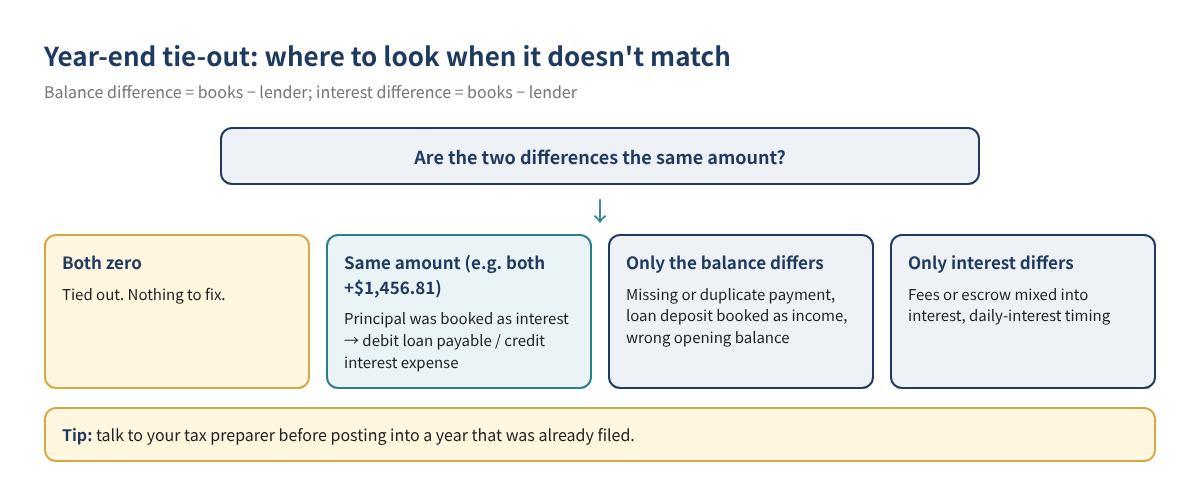
- If the two differences are the same amount, principal was booked as interest; one adjusting entry fixes both.
| Example: 3 payments booked fully as interest | Lender | QuickBooks | Difference |
|---|---|---|---|
| Principal balance, Dec 31 | $29,522.59 | $30,979.40 | $1,456.81 |
| Interest for 2026 | $2,237.22 | $3,694.03 | $1,456.81 |
| Account (Dec 31 adjusting entry) | Debit | Credit |
|---|---|---|
| Loan payable | $1,456.81 | |
| Interest expense | $1,456.81 |
6. Special cases
- Interest-only periods: the whole payment is interest. The principal line is zero until principal payments begin; then split into two lines.
- Balloon payments: when a large amount is due at the end, most of the final payment is principal. Use the lender's payoff balance for the principal line.
- Escrow or insurance in the payment: when taxes or insurance are collected with the payment, record them on a separate third line. Putting them in principal makes the loan drop faster than it really does.
- Extra principal: anything paid above the scheduled payment is principal. Later interest goes down, so recalculate the schedule.
- Lines of credit: draws and repayments come and go, so record each month from the statement's interest and balance instead of a fixed schedule.
7. Common mistakes
- Booking the whole payment as an expense
- Booking the loan deposit as income
- Leaving fees, escrow or insurance in the principal line
- Adding the bank-feed withdrawal again instead of matching it
- Using calculated interest on a daily-interest loan
- Posting an adjusting entry into a filed year without checking first
8. FAQ
How do I record the loan when the money arrives?
Record a deposit into the bank account and assign it to the loan liability account, not to income.
My lender never gave me a schedule.
Use the spreadsheet formulas above. For daily-interest loans, the statement's interest figure is more accurate.
I booked every payment as an expense all year.
The simplest fix is to compare the lender's principal balance with your books at year-end and post one adjusting entry for the difference. If that year was already filed, check with your tax preparer first.
Is all the interest deductible?
This post is about bookkeeping. Whether and how much interest is deductible depends on how the loan was used and your situation, so confirm with your tax preparer. For vehicle loans, see our car loan interest post.
9. Checklist
- ☐ Loan liability account set up with the right type
- ☐ Loan proceeds recorded to the liability, not income
- ☐ Every payment recorded as a principal line plus an interest line
- ☐ Bank-feed withdrawals matched, not added twice
- ☐ Dec 31 balance and yearly interest tied to the lender
- ☐ Any adjusting entry posted before the year is closed
Related posts
- QuickBooks Online Basics for Beginners
- Bulk Reclassify Transactions with a Journal Entry
- Find Duplicate Transactions and Reconciliation Differences
You can download the ready-made Business Loan Payment Splitter & Year-End Balance Tie-Out for free in the Free kit download box below (Excel + PDF guide, no sign-up).
This article is general educational information, not tax, legal or financial advice. No particular result is guaranteed, and your lender's statements are the final word. QuickBooks screens and menu names change often; check your current screens and Intuit's latest guidance.
QuickBooks is a registered trademark of Intuit Inc.; not affiliated with or endorsed by Intuit.
Free kit download
Tools to follow this article step by step. No sign-up needed.
- Excel workbook (.xlsx)Loan_Payment_Splitter_2026_EN.xlsx · 59 KB
- Step-by-step guide (PDF)Loan_Payment_Guide_2026_EN.pdf · 72 KB
Free to use for yourself and your own business; please do not resell or redistribute. General information, not tax, legal or accounting advice; check every figure against your own records. QuickBooks is a trademark of Intuit Inc.; BIZLEX is not affiliated with Intuit.